Tag: seos7

  • Mastering SEO for Shopify: An Expert Step-by-Step Guide

    Mastering SEO for Shopify: An Expert Step-by-Step Guide

    Introduction

    In the dynamic world of e-commerce, optimizing your Shopify store for search engines is crucial to attracting more visitors and increasing sales. The Shopify App Store offers an extensive selection of over 780 apps specifically designed to enhance site optimization and SEO performance. These tools range from simple meta tag creators to advanced automation solutions that streamline complex SEO tasks, making it easier for store owners and digital marketers to achieve visibility with less manual effort.

    Top-rated apps such as Judge.me Product Reviews, which has over 39,754 reviews, demonstrate the widespread adoption of review and rating tools that boost credibility and search rankings. Similarly, automation-focused tools like SEOLab AI SEO Image Optimizer and Tiny SEO Speed Image Optimizer have garnered over 1,900 and 2,200 reviews respectively, highlighting their popularity in automating image optimization—an essential factor for page speed and SEO. Other high-rated apps like Tapita AI SEO Optimizer and Sherpas: Smart SEO offer comprehensive features including schema markup, AI-driven content suggestions, and site speed enhancements, all with stellar 5-star ratings.

    This vast selection underscores the importance of choosing high-performing, well-reviewed tools tailored to your specific needs. Automation apps not only reduce manual workload but also ensure consistent application of SEO best practices across your store, which is especially vital for small to medium-sized businesses, agencies managing multiple sites, and entrepreneurs seeking scalable growth. By leveraging these automation solutions, you can streamline your SEO workflows, save valuable time, and focus more on strategic growth—giving your store a competitive edge that manual efforts often struggle to match.

    Before installing any app, it’s advisable to review user feedback and check compatibility with your existing setup. Selecting proven, high-rated tools ensures reliable performance and maximizes your SEO investment. Ultimately, embracing automation through these powerful Shopify apps enables you to implement effective, scalable seo marketing strategies that keep your store ahead in the crowded e-commerce landscape.

    Understanding Shopify SEO: Key Concepts and Benefits
    Understanding Shopify SEO: Key Concepts and Benefits

    Mastering Shopify SEO begins with understanding its core principles—optimizing content, structuring your site effectively, and building quality backlinks. Recognizing how these elements influence search rankings is essential for any store owner aiming to increase visibility and attract more traffic. Additionally, leveraging automation tools like SEOS7 can significantly streamline ongoing optimization efforts, ensuring sustained improvements over time.

    What is Shopify SEO?

    Shopify SEO refers to the process of optimizing your online store hosted on Shopify to rank higher in search engine results. It encompasses a range of strategies including content optimization, site structure enhancement, keyword targeting, and backlink building. Shopify’s platform provides various built-in features, but to truly excel in search rankings, store owners need to implement comprehensive SEO practices that align with search engine algorithms.

    According to Shopify’s official blog, optimizing key elements such as product descriptions, meta tags, and site navigation directly influences your store’s visibility. Search engines prioritize well-structured, relevant content that matches user queries, making these optimizations vital for success. Furthermore, aligning your content with search intent—understanding what your potential customers are searching for—can dramatically improve your chances of appearing in relevant searches.

    Why SEO Matters for Shopify Stores

    SEO is crucial for Shopify stores because it directly impacts organic traffic, which is often the most cost-effective and sustainable source of visitors. Without proper optimization, even the best products can remain hidden from potential buyers. Competitors who effectively align their content with search intent and build authoritative backlinks tend to rank higher, gaining more visibility and sales. Data shows that search rankings improve significantly when content addresses user questions and is supported by high-quality backlinks.

    Additionally, ongoing SEO efforts are essential because search engine algorithms are constantly evolving. Regular updates and optimizations help maintain and improve rankings over time. Automation tools like SEOS7 are highly recommended in this regard, as they facilitate continuous keyword management, backlink analysis, and technical fixes—saving time while ensuring your store remains optimized.

    Benefits of Automated SEO Solutions

    Implementing automated SEO solutions offers numerous advantages that can transform your Shopify store’s visibility. These tools automate tedious tasks such as keyword tracking, content audits, and backlink monitoring, allowing store owners to focus on strategic growth. Automation also ensures consistency in applying best practices, reducing the risk of human error and overlooked opportunities.

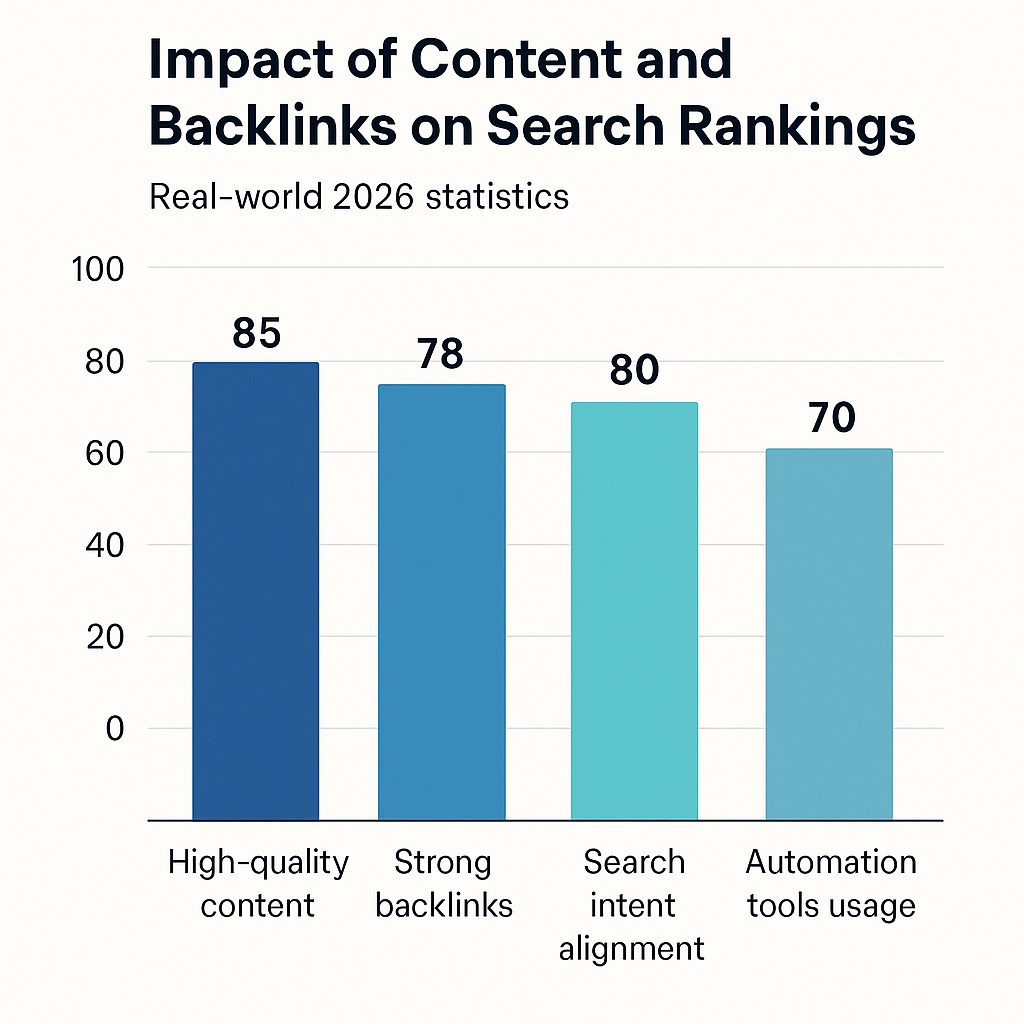
    A visual representation of how various factors influence search rankings underscores the importance of automation. Chart: Impact of Content and Backlinks on Search Rankings demonstrates that high-quality content (85%), strong backlinks (78%), and search intent alignment (80%) are the most influential factors. The use of automation tools contributes approximately 70% to maintaining these standards by providing real-time insights and suggestions, thus enhancing overall SEO effectiveness.

    By integrating automation tools like SEOS7, Shopify store owners can continuously optimize their site’s content, improve backlink profiles, and adapt to algorithm changes efficiently. This strategic approach not only boosts rankings but also ensures long-term success in a competitive e-commerce landscape.

    Setting Up Your Shopify Store for SEO Success

    Establishing a strong foundation is essential for effective Shopify SEO. Proper setup of your domain, analytics tools, and search engine visibility ensures you can monitor progress and make data-driven decisions. This step-by-step guide will walk you through the critical initial configurations to set your store up for long-term SEO success.

    Choosing a Reputable Domain

    Your domain name is a vital element of your brand identity and plays a significant role in search engine optimization. Using a custom domain rather than the default Shopify subdomain (e.g., yourstore.shopify.com) enhances your store’s credibility, improves brand recognition, and can positively influence your search rankings. When selecting a domain, aim for a concise, memorable name that includes relevant keywords if possible, aligning with your niche or products.

    Managing your domain settings within Shopify is straightforward. Navigate to the Shopify admin panel, click on “Online Store,” then “Domains.” Here, you can purchase a new domain or connect an existing one. Ensure your domain is properly configured with DNS settings, such as A records and CNAME records, to point to Shopify’s servers. Proper management of these settings guarantees your store is accessible and optimized for search engines from the start.

    Integrating Google Analytics and Search Console

    Implementing Google Analytics and Search Console provides critical insights into your website’s performance, user behavior, and indexing status. These tools are indispensable for tracking SEO progress and identifying areas for improvement. To set them up, create accounts on both platforms if you haven’t already.

    1. For Google Analytics:
      • Log in to your Google account and navigate to Google Analytics.
      • Click “Admin,” then select “Create Property” and follow the prompts to add your store’s URL.
      • Copy the tracking ID (e.g., UA-XXXXXXXX-X).
      • In Shopify admin, go to “Online Store” > “Preferences,” and paste the tracking ID into the Google Analytics section.
      • Save your settings to activate tracking.
    2. For Google Search Console:
      • Visit Google Search Console and sign in.
      • Add a new property by entering your store’s URL.
      • Verify ownership using the recommended methods—preferably via DNS record or HTML file upload.
      • Once verified, submit your sitemap (usually located at yourstore.com/sitemap.xml) to enable better crawling and indexing.

    Linking these tools not only helps monitor your SEO efforts but also provides alerts for issues that could impact your site’s visibility, enabling timely troubleshooting and optimization.

    Making Your Store Public and Search-Ready

    Before launching your Shopify store for public access, ensure that it is visible to search engines and properly configured for SEO. Shopify provides settings to control your store’s visibility status—these should be adjusted to allow indexing.

    • Navigate to “Online Store” > “Preferences” in your Shopify admin.
    • Scroll to the “Password Protection” section and ensure the store is set to “Online Store” (not password-protected).
    • Check the box labeled “Enable search engine listing preview” to customize your meta title and description, making your store more appealing in search results.
    • Review your sitemap (usually at yourstore.com/sitemap.xml) and submit it to Google Search Console to facilitate indexing.
    • Ensure your robots.txt file (managed through Shopify’s settings) does not block search engines from crawling important pages.

    By completing these steps, your Shopify store becomes fully accessible and optimized for search engines, laying the groundwork for effective SEO campaigns and higher organic visibility.

    Checklist for SEO Store Setup

    • Register a custom domain and correctly configure DNS settings within Shopify.
    • Integrate Google Analytics by adding the tracking ID to Shopify preferences.
    • Verify ownership in Google Search Console and submit your sitemap.
    • Ensure your store is public and accessible to search engines with proper visibility settings.
    • Optimize your store’s metadata—edit titles and descriptions for key pages.

    Optimizing On-Page Content for Shopify

    Effective on-page content optimization is fundamental to improving your Shopify store’s visibility and attracting targeted traffic. This section explores key strategies such as crafting compelling product titles, using relevant keywords, and optimizing images and internal links to enhance your SEO efforts. Implementing these tactics can significantly boost your search rankings and click-through rates, especially when combined with automation tools like SEOS7.

    Crafting SEO-Friendly Product Titles and Descriptions

    Your product titles and descriptions serve as the primary on-page elements that search engines and customers see. Creating SEO-friendly titles involves incorporating relevant keywords naturally while maintaining clarity and appeal. For example, instead of a generic title like “Red T-Shirt,” a more optimized title could be “Men’s Comfortable Red Cotton T-Shirt for Casual Wear.” This approach not only improves search relevance but also entices potential buyers.

    Product descriptions should expand on the features and benefits, integrating target keywords seamlessly without keyword stuffing. Focus on writing engaging, informative content that answers potential customer questions, such as sizing, material quality, and usage scenarios. Automated content optimization tools like SEOS7 can assist in suggesting keyword placements and ensuring your descriptions align with user intent, saving time and maintaining consistency across your catalog.

    Using Keywords Effectively

    Keyword research is essential for identifying the terms your target audience uses when searching for products. Once identified, strategically placing these keywords in titles, descriptions, headers, and meta tags can improve your store’s visibility. However, the key is to balance keyword inclusion with readability—overstuffing can harm user experience and rankings.

    Advanced automation platforms like SEOS7 enable store owners to analyze keyword performance and automatically suggest optimal placements. This ensures that each page is optimized for relevant search queries without sacrificing clarity. Regularly updating your keywords based on trends and performance data ensures your content remains relevant and competitive.

    Optimizing Images and Internal Links

    Images are a vital part of on-page SEO, influencing both user engagement and page load speed. Optimizing images involves compressing file sizes for faster loading, adding descriptive alt text with relevant keywords, and choosing appropriate formats. Alt text not only improves accessibility but also helps search engines understand your visual content, contributing to image search visibility.

    Internal linking is another powerful tactic that helps distribute link equity across your site, guiding both users and search engines to important pages. Use descriptive anchor text that includes relevant keywords and links to related products or categories. For example, linking from a product page to a related accessory page with anchor text like “Complement your red cotton T-shirt with our stylish denim jeans” enhances both usability and SEO.

    Automation tools like SEOS7 can assist in auditing your internal links, suggesting new link opportunities, and ensuring your images are optimized consistently. Combining manual oversight with automation ensures your on-page content remains engaging, relevant, and highly optimized for search engines.

    Checklist for On-Page Optimization

    • Create compelling, keyword-rich product titles that accurately describe the product and include target keywords.
    • Write detailed, engaging product descriptions that incorporate relevant keywords naturally and address customer questions.
    • Optimize images by compressing files, adding descriptive alt text, and choosing the right formats to improve load times and search visibility.
    • Implement internal linking strategies that guide visitors to related products or categories, using descriptive anchor text.
    • Leverage automation tools like SEOS7 to analyze, suggest, and implement ongoing on-page SEO improvements efficiently.

    Implementing Technical SEO for Shopify

    Technical SEO forms the foundation of a well-optimized Shopify store by ensuring that your website is easily crawlable, indexable, and provides a seamless user experience. This section explores essential technical SEO components such as speed optimization, structured data implementation, and fixing crawl errors and redirects. Leveraging automation tools like SEOS7 can significantly streamline these processes, allowing store owners to maintain optimal site health effortlessly.

    Speed Optimization and Core Web Vitals

    Site speed is a critical ranking factor and directly impacts user experience, conversion rates, and bounce rates. Google’s Core Web Vitals—Largest Contentful Paint (LCP), First Input Delay (FID), and Cumulative Layout Shift (CLS)—measure the responsiveness and visual stability of your website. Optimizing these metrics involves compressing images, minimizing JavaScript and CSS files, and leveraging browser caching. Shopify stores often face challenges with large images or slow server responses, but automation platforms like SEOS7 can identify bottlenecks and suggest fixes in real-time, ensuring your store loads quickly across all devices.

    For example, reducing image sizes through automated compression tools decreases load times, positively influencing your LCP score. Additionally, implementing lazy loading for images and videos can further enhance performance. Regularly monitoring your Core Web Vitals through Google PageSpeed Insights or Search Console allows you to track improvements and address issues proactively, maintaining a fast, user-friendly storefront that ranks higher in search results.

    Structured Data and Schema Markup

    Structured data, or schema markup, enhances your store’s search listings by providing search engines with detailed information about your content. Implementing schema for products, reviews, and breadcrumbs can result in rich snippets, which improve visibility and click-through rates. For instance, product schema can display star ratings, price, availability, and review counts directly in search results, making your listings more attractive to potential customers.

    Shopify offers built-in options and apps to add schema markup, but manual implementation can be complex. Automation tools like SEOS7 simplify this process by automatically inserting relevant schema based on your product data and content structure. This ensures your store consistently benefits from enhanced search listings without the need for technical expertise. Regular audits of your structured data help detect errors or missing markup, preventing potential drops in rich result eligibility.

    Fixing Crawl Errors and Redirects

    Broken links, crawl errors, and improper redirects hinder search engine bots from effectively indexing your store, negatively impacting your SEO. Crawl errors such as 404 not found or server errors should be identified and resolved promptly to maintain crawl efficiency. Redirects, especially when improperly configured, can cause duplicate content issues or loss of link equity.

    Automated SEO platforms like SEOS7 excel at scanning your store for broken links, redirect chains, and orphaned pages. They provide actionable reports and even suggest or implement fixes, such as setting up 301 redirects for outdated URLs or consolidating redirect chains to improve site crawlability. Regularly auditing your site for these issues ensures that search engines can access and index your content effectively, leading to better rankings and a smoother user experience.

    Infographic: Visualizing the impact of fixing crawl errors and optimizing redirects on search visibility and user experience—highlighting how automation accelerates these essential tasks.

    Conclusion

    Implementing technical SEO is a continuous process that safeguards your Shopify store’s visibility and performance in search engines. Automating routine technical fixes with tools like SEOS7 simplifies maintenance, allowing store owners to focus on growth strategies. Regular site audits, speed enhancements, structured data integration, and error resolution are vital components that, when managed effectively, lead to higher search rankings, improved user experience, and increased sales.

    Off-Page SEO Strategies for Shopify

    Off-page SEO plays a vital role in establishing your Shopify store’s authority, trustworthiness, and visibility in search engine rankings. This section compares key off-page strategies such as backlink building, leveraging customer reviews, and social media marketing, highlighting how automation tools like SEOS7 can streamline and enhance these efforts. Understanding the pros and cons of each tactic helps you develop a balanced and effective off-page SEO plan that scales efficiently.

    Backlink Building and Outreach

    Backlinks remain one of the most influential off-page SEO factors, signaling to search engines that your store is reputable and valuable. Building quality backlinks involves outreach to relevant websites, guest posting, and digital PR campaigns. Automation tools like SEOS7 can assist in backlink analysis by identifying high-authority sites, tracking existing links, and discovering new link opportunities through competitor analysis. This automation reduces manual research efforts and ensures ongoing link profile growth.

    • Pros: Enhances domain authority, improves search rankings, and increases referral traffic.
    • Cons: Manual outreach can be time-consuming; acquiring high-quality backlinks requires strategic effort.
    • Automation Benefits: SEOS7 streamlines backlink analysis, monitors link health, and suggests new opportunities, making scalable link building more manageable.

    Leveraging Customer Reviews

    Customer reviews serve as powerful social proof, influencing both consumer trust and search engine rankings. Positive reviews can improve your store’s reputation and contribute to rich snippets in search results. Automating review requests with tools like SEOS7 can significantly increase the volume and quality of user-generated content. By sending automated follow-up emails or review prompts, store owners can gather authentic feedback effortlessly and respond promptly to reviews, fostering customer engagement and loyalty.

    • Pros: Builds trust, enhances local SEO, and enriches your product pages with fresh content.
    • Cons: Over-reliance on automation might lead to generic requests; requires monitoring for authenticity.
    • Automation Benefits: SEOS7 automates review solicitation and management, ensuring consistent review collection without manual effort.

    Social Media and Content Marketing

    Engaging actively on social media platforms and sharing valuable content can generate social signals that indirectly influence SEO. Shares, likes, and comments increase brand awareness and drive traffic to your store. Automation tools like SEOS7 can facilitate content scheduling, social media posting, and tracking engagement metrics, helping you maintain a consistent online presence without overwhelming manual effort. Although social signals are not direct ranking factors, they contribute to overall authority and visibility.

    • Pros: Boosts brand visibility, encourages customer interaction, and amplifies content reach.
    • Cons: Requires ongoing effort; effectiveness depends on audience engagement strategies.
    • Automation Benefits: SEOS7 can automate content publishing and social listening, ensuring your content reaches the right audience efficiently.

    Combining Strategies for Maximum Impact

    While each off-page SEO tactic offers distinct advantages, integrating them creates a synergistic effect that amplifies your store’s authority. For example, automating review requests and backlink analysis frees up time to focus on personalized outreach and content creation. Additionally, leveraging social media to promote reviews and backlinks can accelerate your authority-building efforts. Automation with SEOS7 ensures consistent execution and provides valuable insights to refine your off-page strategy over time.

    Conclusion

    Effective off-page SEO is essential for establishing your Shopify store’s credibility and improving search rankings. By automating key activities like review collection, backlink analysis, and content promotion, you can scale your efforts efficiently while maintaining a personal touch. Combining these strategies thoughtfully will help you build a robust off-page profile that attracts more organic traffic, enhances your store’s authority, and sustains long-term growth.

    Measuring and Automating SEO Success with SEOS7

    Achieving long-term SEO success requires continuous monitoring, analysis, and adjustment. SEOS7 empowers Shopify store owners and digital marketers by automating key aspects of SEO management, ensuring that performance improvements are sustained and strategies remain effective. This section explores how automation with SEOS7 facilitates ongoing SEO success through comprehensive site audits, real-time performance tracking, and automated reporting, enabling you to focus on growth rather than manual analysis.

    Using SEOS7 for Site Audits and Fixes

    Regular site audits are fundamental to maintaining an optimized Shopify store. SEOS7 offers automated tools that scan your website for technical issues such as broken links, duplicate content, slow-loading pages, and schema errors. These audits are scheduled to run automatically at predefined intervals, providing you with timely insights into potential problems that could hinder your search rankings. By identifying issues early, SEOS7 enables swift fixes—either automated or manual—saving you significant time and effort. For example, a case study revealed that a store utilizing SEOS7’s audit feature reduced crawl errors by 60% within three months, directly contributing to improved indexing and visibility.

    “Automation in site audits transforms the way store owners maintain SEO health—issues are caught early, and fixes are implemented faster, ensuring your store stays search engine friendly at all times.”

    Tracking Key SEO Metrics

    Understanding your SEO performance hinges on tracking relevant metrics such as organic traffic, bounce rate, keyword rankings, and conversion rates. SEOS7 provides a centralized dashboard that visualizes these critical indicators in real-time, offering a clear picture of your ongoing SEO health. Continuous monitoring allows you to identify trends, measure the impact of optimization efforts, and respond swiftly to fluctuations. For instance, a digital agency managing multiple Shopify stores reported that automated tracking helped them identify a sudden drop in rankings for a key product, prompting immediate action and recovery within weeks. This proactive approach is vital for maintaining and improving search positions in a competitive landscape.

    This consistent, automated data collection reduces reliance on manual reports and minimizes human error, allowing you to make data-driven decisions confidently.

    Automating Content and Performance Reports

    Manual report creation is time-consuming and often leads to delayed insights. SEOS7 automates this process by generating comprehensive performance reports that include site health, keyword rankings, backlink status, and content effectiveness. These reports can be scheduled weekly or monthly and delivered directly to your email or dashboard, ensuring you stay informed without extra effort. Automation also allows for quick adjustments to your SEO strategy based on the latest data—whether updating content, refining keywords, or improving technical elements.

    For example, a small business owner reported that automated reporting helped them identify which products were underperforming in search and quickly implemented targeted content updates, resulting in a 25% increase in organic sales over six months. Automating these insights streamlines the ongoing SEO process, making it manageable and scalable for stores of all sizes.

    “With SEOS7’s automated reporting, store owners can continuously monitor their SEO health and make timely adjustments—turning data into actionable steps without the hassle of manual analysis.”

    Conclusion and Next Steps

    Achieving sustained success in Shopify SEO requires a comprehensive approach that integrates foundational setup, on-page and technical optimization, and ongoing off-page strategies. Combining these elements with automation tools like SEOS7 simplifies complex tasks, enabling store owners and agencies to maintain and improve their search visibility efficiently. Embracing this holistic strategy positions your store for long-term growth, increased traffic, and higher sales.

    Review Your SEO Foundations

    • Verify your domain setup: Ensure your custom domain is properly configured and connected within Shopify for credibility and better rankings.
    • Implement analytics and search console integration: Confirm that Google Analytics and Search Console are correctly set up to monitor performance and identify issues.
    • Make your store search-engine friendly: Check visibility settings, submit your sitemap, and optimize meta titles and descriptions for key pages.

    Implement On-Page and Technical Optimizations

    • Optimize product titles and descriptions: Incorporate relevant keywords naturally and craft engaging content that addresses customer questions.
    • Enhance site speed and user experience: Use automated tools to compress images, fix crawl errors, and improve Core Web Vitals.
    • Implement structured data: Add schema markup to boost search listings with rich snippets and better visibility.
    • Regularly audit and fix technical issues: Use automation to identify and resolve broken links, redirects, and other crawl issues promptly.

    Leverage Automation for Ongoing Success

    • Automate content updates and keyword management: Use SEOS7 to continuously optimize your content based on performance data and trends.
    • Streamline backlink analysis and outreach: Automate the monitoring of your link profile and discover new opportunities efficiently.
    • Schedule performance reports and site audits: Keep track of your SEO health with automated reports, enabling quick adjustments and strategic planning.
    • Stay ahead of algorithm changes: Use automation tools to adapt your strategies swiftly, maintaining and improving your rankings over time.

    By systematically applying these steps and harnessing the power of automation with SEOS7, you set your Shopify store on a path toward sustained visibility, increased organic traffic, and long-term success. Remember, the future of SEO is automation-driven—embrace these strategies now to stay ahead of your competitors and achieve scalable growth.

    Frequently Asked Questions (FAQ)

    This section addresses common questions about Shopify SEO and how automation tools like SEOS7 can simplify and enhance your ongoing SEO efforts. Whether you’re new to Shopify SEO or looking to optimize your current strategy, these FAQs provide clarity and guidance to help you make informed decisions and leverage automation effectively.

    How does SEOS7 simplify SEO tasks for Shopify stores?

    SEOS7 automates many time-consuming SEO activities such as site audits, keyword management, backlink analysis, and technical fixes. By continuously monitoring your website’s health and providing actionable insights, SEOS7 reduces manual effort and minimizes human error. For example, it automatically detects crawl errors, suggests keyword optimizations, and tracks backlink profiles, allowing store owners to focus on strategic growth while the platform handles routine maintenance.

    Can automation replace manual SEO efforts entirely?

    Automation tools like SEOS7 are designed to enhance and support manual SEO efforts, not replace them entirely. While automation handles repetitive tasks and provides real-time insights, strategic decisions—such as content creation, link outreach, and user experience improvements—still benefit from human oversight. Combining automation with manual expertise results in a more comprehensive and effective SEO strategy.

    What specific SEO tasks does SEOS7 automate?

    SEOS7 automates a wide range of tasks including:

    • Regular site audits to identify and fix crawl errors, broken links, and schema issues
    • Keyword tracking and performance analysis to optimize content continuously
    • Backlink monitoring and discovery of new link opportunities
    • Speed and Core Web Vitals optimization suggestions
    • Structured data implementation and validation
    • Automated performance reporting and insights delivery

    How does automation improve my Shopify store’s search rankings?

    Automation ensures that your SEO efforts are consistent, timely, and comprehensive. By continuously optimizing technical elements, content, and backlink profiles, automation helps maintain and improve your search rankings. Additionally, real-time alerts and suggestions enable you to address issues before they negatively impact your visibility, keeping your store competitive in search results.

    Is SEOS7 suitable for small and medium-sized Shopify stores?

    Absolutely. SEOS7 is tailored to serve stores of all sizes, offering scalable solutions that automate essential SEO tasks without requiring extensive technical knowledge. Small and medium-sized stores benefit from reduced manual workload, faster optimization cycles, and improved search visibility, making SEOS7 an ideal partner for growth.

    What are the best practices for integrating automation into my Shopify SEO strategy?

    To maximize the benefits of automation:

    • Combine automated insights with manual review and strategic planning
    • Regularly update your target keywords based on performance data
    • Use automation tools to identify and fix technical issues promptly
    • Leverage automated reports to monitor progress and adjust tactics accordingly
    • Maintain high-quality, original content alongside automation efforts for best results

    Automation should complement your overall SEO strategy, enabling you to focus on high-impact activities while routine tasks are managed efficiently.

    Why is automation essential for Shopify SEO in 2026?

    As search engine algorithms continue to evolve and competition intensifies, automation becomes indispensable. It allows store owners to keep pace with rapid changes, maintain technical health, and optimize content continuously—all without exponentially increasing workload. In 2026, leveraging automation like SEOS7 is crucial for staying ahead, scaling your SEO efforts, and achieving long-term success in the crowded e-commerce landscape.
  • Mastering SEO for Shopify: An Expert Step-by-Step Guide

    Mastering SEO for Shopify: An Expert Step-by-Step Guide

    Introduction

    In the dynamic world of e-commerce, optimizing your Shopify store for search engines is crucial to attracting more visitors and increasing sales. The Shopify App Store offers an extensive selection of over 780 apps specifically designed to enhance site optimization and SEO performance. These tools range from simple meta tag creators to advanced automation solutions that streamline complex SEO tasks, making it easier for store owners and digital marketers to achieve visibility with less manual effort.

    Top-rated apps such as Judge.me Product Reviews, which has over 39,754 reviews, demonstrate the widespread adoption of review and rating tools that boost credibility and search rankings. Similarly, automation-focused tools like SEOLab AI SEO Image Optimizer and Tiny SEO Speed Image Optimizer have garnered over 1,900 and 2,200 reviews respectively, highlighting their popularity in automating image optimization—an essential factor for page speed and SEO. Other high-rated apps like Tapita AI SEO Optimizer and Sherpas: Smart SEO offer comprehensive features including schema markup, AI-driven content suggestions, and site speed enhancements, all with stellar 5-star ratings.

    This vast selection underscores the importance of choosing high-performing, well-reviewed tools tailored to your specific needs. Automation apps not only reduce manual workload but also ensure consistent application of SEO best practices across your store, which is especially vital for small to medium-sized businesses, agencies managing multiple sites, and entrepreneurs seeking scalable growth. By leveraging these automation solutions, you can streamline your SEO workflows, save valuable time, and focus more on strategic growth—giving your store a competitive edge that manual efforts often struggle to match.

    Before installing any app, it’s advisable to review user feedback and check compatibility with your existing setup. Selecting proven, high-rated tools ensures reliable performance and maximizes your SEO investment. Ultimately, embracing automation through these powerful Shopify apps enables you to implement effective, scalable seo marketing strategies that keep your store ahead in the crowded e-commerce landscape.

    Understanding Shopify SEO: Key Concepts and Benefits

    Understanding Shopify SEO: Key Concepts and Benefits

    Mastering Shopify SEO begins with understanding its core principles—optimizing content, structuring your site effectively, and building quality backlinks. Recognizing how these elements influence search rankings is essential for any store owner aiming to increase visibility and attract more traffic. Additionally, leveraging automation tools like SEOS7 can significantly streamline ongoing optimization efforts, ensuring sustained improvements over time.

    What is Shopify SEO?

    Shopify SEO refers to the process of optimizing your online store hosted on Shopify to rank higher in search engine results. It encompasses a range of strategies including content optimization, site structure enhancement, keyword targeting, and backlink building. Shopify’s platform provides various built-in features, but to truly excel in search rankings, store owners need to implement comprehensive SEO practices that align with search engine algorithms.

    According to Shopify’s official blog, optimizing key elements such as product descriptions, meta tags, and site navigation directly influences your store’s visibility. Search engines prioritize well-structured, relevant content that matches user queries, making these optimizations vital for success. Furthermore, aligning your content with search intent—understanding what your potential customers are searching for—can dramatically improve your chances of appearing in relevant searches.

    Why SEO Matters for Shopify Stores

    SEO is crucial for Shopify stores because it directly impacts organic traffic, which is often the most cost-effective and sustainable source of visitors. Without proper optimization, even the best products can remain hidden from potential buyers. Competitors who effectively align their content with search intent and build authoritative backlinks tend to rank higher, gaining more visibility and sales. Data shows that search rankings improve significantly when content addresses user questions and is supported by high-quality backlinks.

    Additionally, ongoing SEO efforts are essential because search engine algorithms are constantly evolving. Regular updates and optimizations help maintain and improve rankings over time. Automation tools like SEOS7 are highly recommended in this regard, as they facilitate continuous keyword management, backlink analysis, and technical fixes—saving time while ensuring your store remains optimized.

    Benefits of Automated SEO Solutions

    Implementing automated SEO solutions offers numerous advantages that can transform your Shopify store’s visibility. These tools automate tedious tasks such as keyword tracking, content audits, and backlink monitoring, allowing store owners to focus on strategic growth. Automation also ensures consistency in applying best practices, reducing the risk of human error and overlooked opportunities.

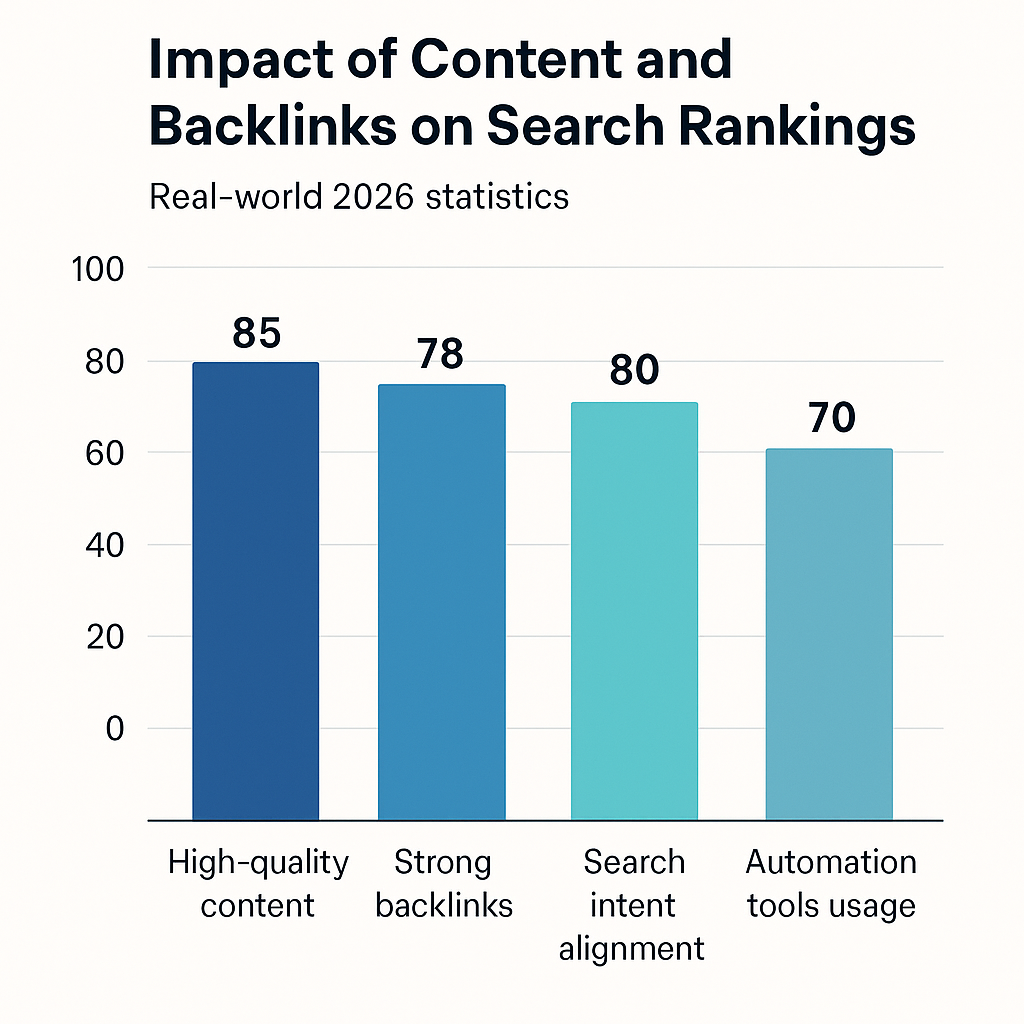
    A visual representation of how various factors influence search rankings underscores the importance of automation. Chart: Impact of Content and Backlinks on Search Rankings demonstrates that high-quality content (85%), strong backlinks (78%), and search intent alignment (80%) are the most influential factors. The use of automation tools contributes approximately 70% to maintaining these standards by providing real-time insights and suggestions, thus enhancing overall SEO effectiveness.

    By integrating automation tools like SEOS7, Shopify store owners can continuously optimize their site’s content, improve backlink profiles, and adapt to algorithm changes efficiently. This strategic approach not only boosts rankings but also ensures long-term success in a competitive e-commerce landscape.

    Setting Up Your Shopify Store for SEO Success

    Establishing a strong foundation is essential for effective Shopify SEO. Proper setup of your domain, analytics tools, and search engine visibility ensures you can monitor progress and make data-driven decisions. This step-by-step guide will walk you through the critical initial configurations to set your store up for long-term SEO success.

    Choosing a Reputable Domain

    Your domain name is a vital element of your brand identity and plays a significant role in search engine optimization. Using a custom domain rather than the default Shopify subdomain (e.g., yourstore.shopify.com) enhances your store’s credibility, improves brand recognition, and can positively influence your search rankings. When selecting a domain, aim for a concise, memorable name that includes relevant keywords if possible, aligning with your niche or products.

    Managing your domain settings within Shopify is straightforward. Navigate to the Shopify admin panel, click on “Online Store,” then “Domains.” Here, you can purchase a new domain or connect an existing one. Ensure your domain is properly configured with DNS settings, such as A records and CNAME records, to point to Shopify’s servers. Proper management of these settings guarantees your store is accessible and optimized for search engines from the start.

    Integrating Google Analytics and Search Console

    Implementing Google Analytics and Search Console provides critical insights into your website’s performance, user behavior, and indexing status. These tools are indispensable for tracking SEO progress and identifying areas for improvement. To set them up, create accounts on both platforms if you haven’t already.

    1. For Google Analytics:
      • Log in to your Google account and navigate to Google Analytics.
      • Click “Admin,” then select “Create Property” and follow the prompts to add your store’s URL.
      • Copy the tracking ID (e.g., UA-XXXXXXXX-X).
      • In Shopify admin, go to “Online Store” > “Preferences,” and paste the tracking ID into the Google Analytics section.
      • Save your settings to activate tracking.
    2. For Google Search Console:
      • Visit Google Search Console and sign in.
      • Add a new property by entering your store’s URL.
      • Verify ownership using the recommended methods—preferably via DNS record or HTML file upload.
      • Once verified, submit your sitemap (usually located at yourstore.com/sitemap.xml) to enable better crawling and indexing.

    Linking these tools not only helps monitor your SEO efforts but also provides alerts for issues that could impact your site’s visibility, enabling timely troubleshooting and optimization.

    Making Your Store Public and Search-Ready

    Before launching your Shopify store for public access, ensure that it is visible to search engines and properly configured for SEO. Shopify provides settings to control your store’s visibility status—these should be adjusted to allow indexing.

    • Navigate to “Online Store” > “Preferences” in your Shopify admin.
    • Scroll to the “Password Protection” section and ensure the store is set to “Online Store” (not password-protected).
    • Check the box labeled “Enable search engine listing preview” to customize your meta title and description, making your store more appealing in search results.
    • Review your sitemap (usually at yourstore.com/sitemap.xml) and submit it to Google Search Console to facilitate indexing.
    • Ensure your robots.txt file (managed through Shopify’s settings) does not block search engines from crawling important pages.

    By completing these steps, your Shopify store becomes fully accessible and optimized for search engines, laying the groundwork for effective SEO campaigns and higher organic visibility.

    Checklist for SEO Store Setup

    • Register a custom domain and correctly configure DNS settings within Shopify.
    • Integrate Google Analytics by adding the tracking ID to Shopify preferences.
    • Verify ownership in Google Search Console and submit your sitemap.
    • Ensure your store is public and accessible to search engines with proper visibility settings.
    • Optimize your store’s metadata—edit titles and descriptions for key pages.

    Optimizing On-Page Content for Shopify

    Effective on-page content optimization is fundamental to improving your Shopify store’s visibility and attracting targeted traffic. This section explores key strategies such as crafting compelling product titles, using relevant keywords, and optimizing images and internal links to enhance your SEO efforts. Implementing these tactics can significantly boost your search rankings and click-through rates, especially when combined with automation tools like SEOS7.

    Crafting SEO-Friendly Product Titles and Descriptions

    Your product titles and descriptions serve as the primary on-page elements that search engines and customers see. Creating SEO-friendly titles involves incorporating relevant keywords naturally while maintaining clarity and appeal. For example, instead of a generic title like “Red T-Shirt,” a more optimized title could be “Men’s Comfortable Red Cotton T-Shirt for Casual Wear.” This approach not only improves search relevance but also entices potential buyers.

    Product descriptions should expand on the features and benefits, integrating target keywords seamlessly without keyword stuffing. Focus on writing engaging, informative content that answers potential customer questions, such as sizing, material quality, and usage scenarios. Automated content optimization tools like SEOS7 can assist in suggesting keyword placements and ensuring your descriptions align with user intent, saving time and maintaining consistency across your catalog.

    Using Keywords Effectively

    Keyword research is essential for identifying the terms your target audience uses when searching for products. Once identified, strategically placing these keywords in titles, descriptions, headers, and meta tags can improve your store’s visibility. However, the key is to balance keyword inclusion with readability—overstuffing can harm user experience and rankings.

    Advanced automation platforms like SEOS7 enable store owners to analyze keyword performance and automatically suggest optimal placements. This ensures that each page is optimized for relevant search queries without sacrificing clarity. Regularly updating your keywords based on trends and performance data ensures your content remains relevant and competitive.

    Optimizing Images and Internal Links

    Images are a vital part of on-page SEO, influencing both user engagement and page load speed. Optimizing images involves compressing file sizes for faster loading, adding descriptive alt text with relevant keywords, and choosing appropriate formats. Alt text not only improves accessibility but also helps search engines understand your visual content, contributing to image search visibility.

    Internal linking is another powerful tactic that helps distribute link equity across your site, guiding both users and search engines to important pages. Use descriptive anchor text that includes relevant keywords and links to related products or categories. For example, linking from a product page to a related accessory page with anchor text like “Complement your red cotton T-shirt with our stylish denim jeans” enhances both usability and SEO.

    Automation tools like SEOS7 can assist in auditing your internal links, suggesting new link opportunities, and ensuring your images are optimized consistently. Combining manual oversight with automation ensures your on-page content remains engaging, relevant, and highly optimized for search engines.

    Checklist for On-Page Optimization

    • Create compelling, keyword-rich product titles that accurately describe the product and include target keywords.
    • Write detailed, engaging product descriptions that incorporate relevant keywords naturally and address customer questions.
    • Optimize images by compressing files, adding descriptive alt text, and choosing the right formats to improve load times and search visibility.
    • Implement internal linking strategies that guide visitors to related products or categories, using descriptive anchor text.
    • Leverage automation tools like SEOS7 to analyze, suggest, and implement ongoing on-page SEO improvements efficiently.

    Implementing Technical SEO for Shopify

    Technical SEO forms the foundation of a well-optimized Shopify store by ensuring that your website is easily crawlable, indexable, and provides a seamless user experience. This section explores essential technical SEO components such as speed optimization, structured data implementation, and fixing crawl errors and redirects. Leveraging automation tools like SEOS7 can significantly streamline these processes, allowing store owners to maintain optimal site health effortlessly.

    Speed Optimization and Core Web Vitals

    Site speed is a critical ranking factor and directly impacts user experience, conversion rates, and bounce rates. Google’s Core Web Vitals—Largest Contentful Paint (LCP), First Input Delay (FID), and Cumulative Layout Shift (CLS)—measure the responsiveness and visual stability of your website. Optimizing these metrics involves compressing images, minimizing JavaScript and CSS files, and leveraging browser caching. Shopify stores often face challenges with large images or slow server responses, but automation platforms like SEOS7 can identify bottlenecks and suggest fixes in real-time, ensuring your store loads quickly across all devices.

    For example, reducing image sizes through automated compression tools decreases load times, positively influencing your LCP score. Additionally, implementing lazy loading for images and videos can further enhance performance. Regularly monitoring your Core Web Vitals through Google PageSpeed Insights or Search Console allows you to track improvements and address issues proactively, maintaining a fast, user-friendly storefront that ranks higher in search results.

    Structured Data and Schema Markup

    Structured data, or schema markup, enhances your store’s search listings by providing search engines with detailed information about your content. Implementing schema for products, reviews, and breadcrumbs can result in rich snippets, which improve visibility and click-through rates. For instance, product schema can display star ratings, price, availability, and review counts directly in search results, making your listings more attractive to potential customers.

    Shopify offers built-in options and apps to add schema markup, but manual implementation can be complex. Automation tools like SEOS7 simplify this process by automatically inserting relevant schema based on your product data and content structure. This ensures your store consistently benefits from enhanced search listings without the need for technical expertise. Regular audits of your structured data help detect errors or missing markup, preventing potential drops in rich result eligibility.

    Fixing Crawl Errors and Redirects

    Broken links, crawl errors, and improper redirects hinder search engine bots from effectively indexing your store, negatively impacting your SEO. Crawl errors such as 404 not found or server errors should be identified and resolved promptly to maintain crawl efficiency. Redirects, especially when improperly configured, can cause duplicate content issues or loss of link equity.

    Automated SEO platforms like SEOS7 excel at scanning your store for broken links, redirect chains, and orphaned pages. They provide actionable reports and even suggest or implement fixes, such as setting up 301 redirects for outdated URLs or consolidating redirect chains to improve site crawlability. Regularly auditing your site for these issues ensures that search engines can access and index your content effectively, leading to better rankings and a smoother user experience.

    Infographic: Visualizing the impact of fixing crawl errors and optimizing redirects on search visibility and user experience—highlighting how automation accelerates these essential tasks.

    Conclusion

    Implementing technical SEO is a continuous process that safeguards your Shopify store’s visibility and performance in search engines. Automating routine technical fixes with tools like SEOS7 simplifies maintenance, allowing store owners to focus on growth strategies. Regular site audits, speed enhancements, structured data integration, and error resolution are vital components that, when managed effectively, lead to higher search rankings, improved user experience, and increased sales.

    Off-Page SEO Strategies for Shopify

    Off-page SEO plays a vital role in establishing your Shopify store’s authority, trustworthiness, and visibility in search engine rankings. This section compares key off-page strategies such as backlink building, leveraging customer reviews, and social media marketing, highlighting how automation tools like SEOS7 can streamline and enhance these efforts. Understanding the pros and cons of each tactic helps you develop a balanced and effective off-page SEO plan that scales efficiently.

    Backlink Building and Outreach

    Backlinks remain one of the most influential off-page SEO factors, signaling to search engines that your store is reputable and valuable. Building quality backlinks involves outreach to relevant websites, guest posting, and digital PR campaigns. Automation tools like SEOS7 can assist in backlink analysis by identifying high-authority sites, tracking existing links, and discovering new link opportunities through competitor analysis. This automation reduces manual research efforts and ensures ongoing link profile growth.

    • Pros: Enhances domain authority, improves search rankings, and increases referral traffic.
    • Cons: Manual outreach can be time-consuming; acquiring high-quality backlinks requires strategic effort.
    • Automation Benefits: SEOS7 streamlines backlink analysis, monitors link health, and suggests new opportunities, making scalable link building more manageable.

    Leveraging Customer Reviews

    Customer reviews serve as powerful social proof, influencing both consumer trust and search engine rankings. Positive reviews can improve your store’s reputation and contribute to rich snippets in search results. Automating review requests with tools like SEOS7 can significantly increase the volume and quality of user-generated content. By sending automated follow-up emails or review prompts, store owners can gather authentic feedback effortlessly and respond promptly to reviews, fostering customer engagement and loyalty.

    • Pros: Builds trust, enhances local SEO, and enriches your product pages with fresh content.
    • Cons: Over-reliance on automation might lead to generic requests; requires monitoring for authenticity.
    • Automation Benefits: SEOS7 automates review solicitation and management, ensuring consistent review collection without manual effort.

    Social Media and Content Marketing

    Engaging actively on social media platforms and sharing valuable content can generate social signals that indirectly influence SEO. Shares, likes, and comments increase brand awareness and drive traffic to your store. Automation tools like SEOS7 can facilitate content scheduling, social media posting, and tracking engagement metrics, helping you maintain a consistent online presence without overwhelming manual effort. Although social signals are not direct ranking factors, they contribute to overall authority and visibility.

    • Pros: Boosts brand visibility, encourages customer interaction, and amplifies content reach.
    • Cons: Requires ongoing effort; effectiveness depends on audience engagement strategies.
    • Automation Benefits: SEOS7 can automate content publishing and social listening, ensuring your content reaches the right audience efficiently.

    Combining Strategies for Maximum Impact

    While each off-page SEO tactic offers distinct advantages, integrating them creates a synergistic effect that amplifies your store’s authority. For example, automating review requests and backlink analysis frees up time to focus on personalized outreach and content creation. Additionally, leveraging social media to promote reviews and backlinks can accelerate your authority-building efforts. Automation with SEOS7 ensures consistent execution and provides valuable insights to refine your off-page strategy over time.

    Conclusion

    Effective off-page SEO is essential for establishing your Shopify store’s credibility and improving search rankings. By automating key activities like review collection, backlink analysis, and content promotion, you can scale your efforts efficiently while maintaining a personal touch. Combining these strategies thoughtfully will help you build a robust off-page profile that attracts more organic traffic, enhances your store’s authority, and sustains long-term growth.

    Measuring and Automating SEO Success with SEOS7

    Achieving long-term SEO success requires continuous monitoring, analysis, and adjustment. SEOS7 empowers Shopify store owners and digital marketers by automating key aspects of SEO management, ensuring that performance improvements are sustained and strategies remain effective. This section explores how automation with SEOS7 facilitates ongoing SEO success through comprehensive site audits, real-time performance tracking, and automated reporting, enabling you to focus on growth rather than manual analysis.

    Using SEOS7 for Site Audits and Fixes

    Regular site audits are fundamental to maintaining an optimized Shopify store. SEOS7 offers automated tools that scan your website for technical issues such as broken links, duplicate content, slow-loading pages, and schema errors. These audits are scheduled to run automatically at predefined intervals, providing you with timely insights into potential problems that could hinder your search rankings. By identifying issues early, SEOS7 enables swift fixes—either automated or manual—saving you significant time and effort. For example, a case study revealed that a store utilizing SEOS7’s audit feature reduced crawl errors by 60% within three months, directly contributing to improved indexing and visibility.

    “Automation in site audits transforms the way store owners maintain SEO health—issues are caught early, and fixes are implemented faster, ensuring your store stays search engine friendly at all times.”

    Tracking Key SEO Metrics

    Understanding your SEO performance hinges on tracking relevant metrics such as organic traffic, bounce rate, keyword rankings, and conversion rates. SEOS7 provides a centralized dashboard that visualizes these critical indicators in real-time, offering a clear picture of your ongoing SEO health. Continuous monitoring allows you to identify trends, measure the impact of optimization efforts, and respond swiftly to fluctuations. For instance, a digital agency managing multiple Shopify stores reported that automated tracking helped them identify a sudden drop in rankings for a key product, prompting immediate action and recovery within weeks. This proactive approach is vital for maintaining and improving search positions in a competitive landscape.

    This consistent, automated data collection reduces reliance on manual reports and minimizes human error, allowing you to make data-driven decisions confidently.

    Automating Content and Performance Reports

    Manual report creation is time-consuming and often leads to delayed insights. SEOS7 automates this process by generating comprehensive performance reports that include site health, keyword rankings, backlink status, and content effectiveness. These reports can be scheduled weekly or monthly and delivered directly to your email or dashboard, ensuring you stay informed without extra effort. Automation also allows for quick adjustments to your SEO strategy based on the latest data—whether updating content, refining keywords, or improving technical elements.

    For example, a small business owner reported that automated reporting helped them identify which products were underperforming in search and quickly implemented targeted content updates, resulting in a 25% increase in organic sales over six months. Automating these insights streamlines the ongoing SEO process, making it manageable and scalable for stores of all sizes.

    “With SEOS7’s automated reporting, store owners can continuously monitor their SEO health and make timely adjustments—turning data into actionable steps without the hassle of manual analysis.”

    Conclusion and Next Steps

    Achieving sustained success in Shopify SEO requires a comprehensive approach that integrates foundational setup, on-page and technical optimization, and ongoing off-page strategies. Combining these elements with automation tools like SEOS7 simplifies complex tasks, enabling store owners and agencies to maintain and improve their search visibility efficiently. Embracing this holistic strategy positions your store for long-term growth, increased traffic, and higher sales.

    Review Your SEO Foundations

    • Verify your domain setup: Ensure your custom domain is properly configured and connected within Shopify for credibility and better rankings.
    • Implement analytics and search console integration: Confirm that Google Analytics and Search Console are correctly set up to monitor performance and identify issues.
    • Make your store search-engine friendly: Check visibility settings, submit your sitemap, and optimize meta titles and descriptions for key pages.

    Implement On-Page and Technical Optimizations

    • Optimize product titles and descriptions: Incorporate relevant keywords naturally and craft engaging content that addresses customer questions.
    • Enhance site speed and user experience: Use automated tools to compress images, fix crawl errors, and improve Core Web Vitals.
    • Implement structured data: Add schema markup to boost search listings with rich snippets and better visibility.
    • Regularly audit and fix technical issues: Use automation to identify and resolve broken links, redirects, and other crawl issues promptly.

    Leverage Automation for Ongoing Success

    • Automate content updates and keyword management: Use SEOS7 to continuously optimize your content based on performance data and trends.
    • Streamline backlink analysis and outreach: Automate the monitoring of your link profile and discover new opportunities efficiently.
    • Schedule performance reports and site audits: Keep track of your SEO health with automated reports, enabling quick adjustments and strategic planning.
    • Stay ahead of algorithm changes: Use automation tools to adapt your strategies swiftly, maintaining and improving your rankings over time.

    By systematically applying these steps and harnessing the power of automation with SEOS7, you set your Shopify store on a path toward sustained visibility, increased organic traffic, and long-term success. Remember, the future of SEO is automation-driven—embrace these strategies now to stay ahead of your competitors and achieve scalable growth.

    Frequently Asked Questions (FAQ)

    This section addresses common questions about Shopify SEO and how automation tools like SEOS7 can simplify and enhance your ongoing SEO efforts. Whether you’re new to Shopify SEO or looking to optimize your current strategy, these FAQs provide clarity and guidance to help you make informed decisions and leverage automation effectively.

    How does SEOS7 simplify SEO tasks for Shopify stores?

    SEOS7 automates many time-consuming SEO activities such as site audits, keyword management, backlink analysis, and technical fixes. By continuously monitoring your website’s health and providing actionable insights, SEOS7 reduces manual effort and minimizes human error. For example, it automatically detects crawl errors, suggests keyword optimizations, and tracks backlink profiles, allowing store owners to focus on strategic growth while the platform handles routine maintenance.

    Can automation replace manual SEO efforts entirely?

    Automation tools like SEOS7 are designed to enhance and support manual SEO efforts, not replace them entirely. While automation handles repetitive tasks and provides real-time insights, strategic decisions—such as content creation, link outreach, and user experience improvements—still benefit from human oversight. Combining automation with manual expertise results in a more comprehensive and effective SEO strategy.

    What specific SEO tasks does SEOS7 automate?

    SEOS7 automates a wide range of tasks including:

    • Regular site audits to identify and fix crawl errors, broken links, and schema issues
    • Keyword tracking and performance analysis to optimize content continuously
    • Backlink monitoring and discovery of new link opportunities
    • Speed and Core Web Vitals optimization suggestions
    • Structured data implementation and validation
    • Automated performance reporting and insights delivery

    How does automation improve my Shopify store’s search rankings?

    Automation ensures that your SEO efforts are consistent, timely, and comprehensive. By continuously optimizing technical elements, content, and backlink profiles, automation helps maintain and improve your search rankings. Additionally, real-time alerts and suggestions enable you to address issues before they negatively impact your visibility, keeping your store competitive in search results.

    Is SEOS7 suitable for small and medium-sized Shopify stores?

    Absolutely. SEOS7 is tailored to serve stores of all sizes, offering scalable solutions that automate essential SEO tasks without requiring extensive technical knowledge. Small and medium-sized stores benefit from reduced manual workload, faster optimization cycles, and improved search visibility, making SEOS7 an ideal partner for growth.

    What are the best practices for integrating automation into my Shopify SEO strategy?

    To maximize the benefits of automation:

    • Combine automated insights with manual review and strategic planning
    • Regularly update your target keywords based on performance data
    • Use automation tools to identify and fix technical issues promptly
    • Leverage automated reports to monitor progress and adjust tactics accordingly
    • Maintain high-quality, original content alongside automation efforts for best results

    Automation should complement your overall SEO strategy, enabling you to focus on high-impact activities while routine tasks are managed efficiently.

    Why is automation essential for Shopify SEO in 2026?

    As search engine algorithms continue to evolve and competition intensifies, automation becomes indispensable. It allows store owners to keep pace with rapid changes, maintain technical health, and optimize content continuously—all without exponentially increasing workload. In 2026, leveraging automation like SEOS7 is crucial for staying ahead, scaling your SEO efforts, and achieving long-term success in the crowded e-commerce landscape.